The way brands produce video has changed more in the last two years than in the previous two decades. Traditional production once meant cameras, crews, long timelines, and big budgets. Today, global brands are moving away from these limitations and embracing AI-powered solutions like Vidnoz AI. Instead of managing complex shoots and costly post-production, companies can now create high-quality videos using realistic AI avatars in a fraction of the time. In this guide, we’ll take a comprehensive look at Vidnoz AI, helping you understand how this powerful AI video generator is revolutionizing the way videos are created.
Part 1: Overview of Vidnoz AI
Vidnoz AI is a cutting-edge artificial intelligence platform that offers a diverse range of innovative tools and solutions designed to enhance video creation quality and productivity. It enables users to generate professional-looking videos without cameras, actors, or technical expertise. With features like realistic AI avatars, natural-sounding AI voices, customizable templates, and fast rendering, Vidnoz AI streamlines the entire production process. The standout feature of this incredible tool is that it is certified with ISO/IEC 27001:2022 for Information Security Management, ensuring the highest standards of data protection and privacy. Beyond security, Vidnoz AI also supports multilingual video creation, allowing brands to easily produce content in the audience’s local language.
Part 2: Why Brands Prefer Vidnoz AI Over Traditional Filming
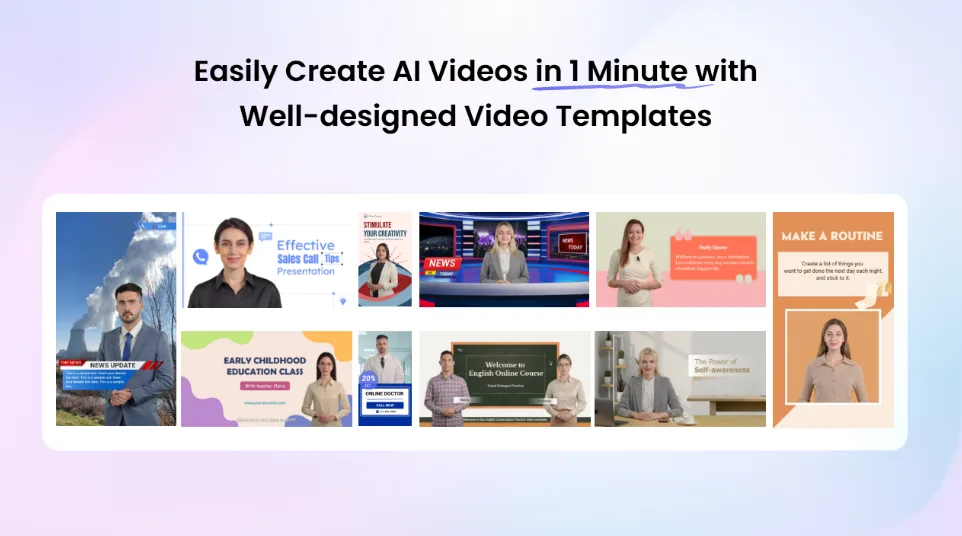
Vidnoz AI offers amazing features and capabilities, making it the preferred choice for brands over traditional filming methods. Here are the top features of this program:
- Lifelike AI Avatars: Vidnoz AI offers over 1900 realistic avatars, each representing different industries and roles. The program features realistic avatars of teachers, students, hosts, doctors, customer support staff, executives, and more. Additionally, users can generate a digital twin that can speak in over 40 languages using Avatar Lite, and Avatar Pro offers deeper customization, such as flexible backgrounds.
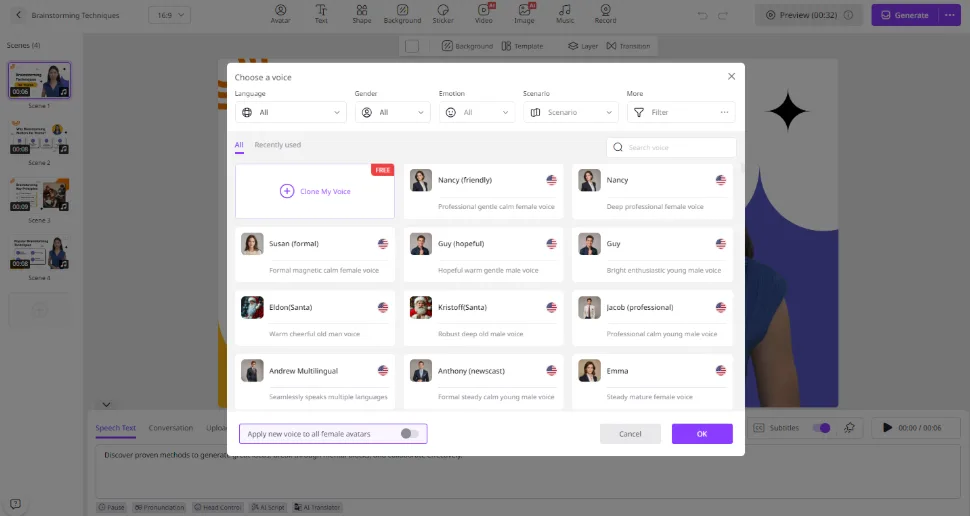
- Natural-Sounding AI Voices: The best part of Vidnoz AI is that it includes 2000+ AI voices, all powered by ElevenLabs, Google, and Microsoft. Plus, with voice cloning, users can generate a synthetic voice using audio recordings that resemble 99% of the real voice.
- Customizable Templates: Another amazing feature of Vidnoz AI is its collection of 2800+ video templates, allowing users to create various types of videos, such as how-to guides, marketing, tutorials, product demos, sales pitches, breaking news, and more. Users can also use custom templates to accelerate the brand video creation, cultivating a distinctive brand image.
- Free Version: Vidnoz AI’s free version allows users to explore the platform’s core features without any cost. The free version provides 60 credits, enabling users to create AI-generated videos and test essential functionalities. This version is ideal for beginners, startups, or marketers.
- AI Video Wizard: No professional help required? Yes, with Vidnoz AI Video Wizard, users can generate high-quality and professional-looking videos with a single text prompt or any source material.
Part 3: Real-World Use Cases for Vidnoz AI
Vidnoz AI is transforming how businesses and creators approach video content, offering solutions across a wide range of industries:
- Marketing Campaigns: Brands can quickly produce engaging promotional videos, social media ads, and product launches without relying on expensive shoots.
- Training Videos: With the help of Vidnoz AI, companies can create instructional videos, tutorials, and training modules. Multilingual voiceovers allow content to reach a global audience.
- Social Media Content: Vidnoz AI enables content creators to generate high-quality videos for YouTube, Instagram, TikTok, and other platforms quickly.
- Product Demos: Vidnoz AI makes creating product demos faster, more engaging, and cost-effective. Brands can use AI avatars to explain product features and benefits without the need for actors.
Part 4: How to Create AI Avatar Videos With Vidnoz AI?
Vidnoz AI offers an intuitive interface, allowing users to create high-quality videos without professional help. Here is how to do it:
- Navigate to Vidnoz AI’s official site and click on the “Create Free Video Now” button. Choose the templates and AI Avatars.
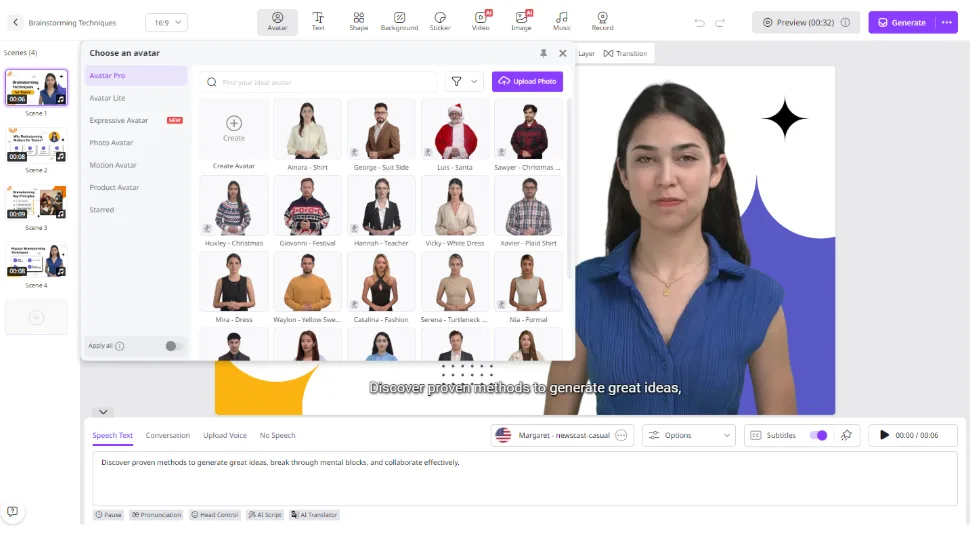
- Next, input your text and select the AI voice. Users can also choose the language for their video, as Vidnoz AI supports over 140 languages, including English, Spanish, and Chinese.
- Use the Online Video Editor to customize the AI video according to your requirements. It enables you to change the background, insert text, and more.
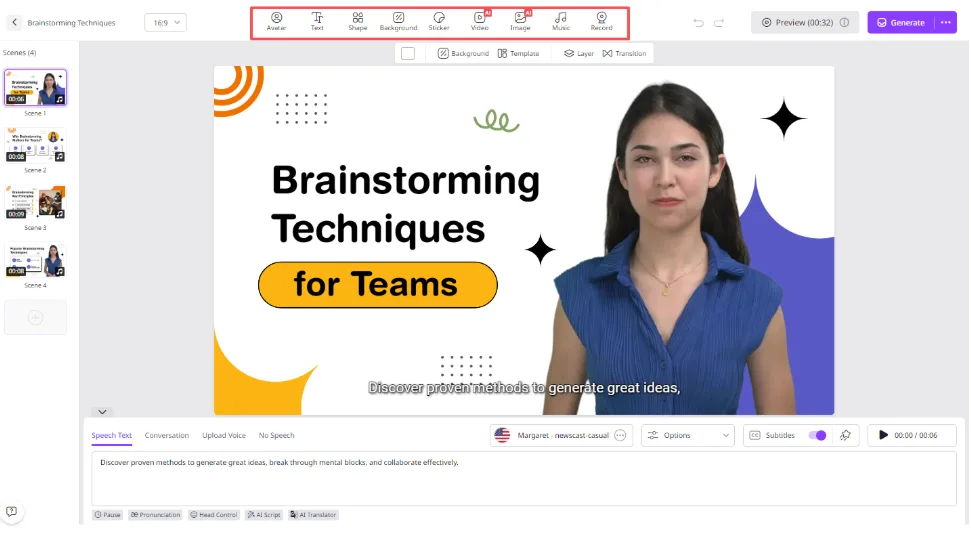
- Finally, click on the “Generate” button to begin the video creation process. Within seconds, your AI video will be ready. Preview it and if satisfied with the result, click on the “Download” button.
Final Thoughts
Traditional video production has become a specialized luxury, while AI-powered video is a big part of our everyday tasks. For businesses without massive budgets, AI video consistently delivers better ROI across most content needs. Platforms like Vidnoz AI are at the forefront of this transformation.
Also Read: The Best Face Swap AI Tools of 2025